HowTo:Get All Features (Browser, MMS) Working on AT&T w/Unlocked Storm 95xx
-

- 6,648
Method #1 Step by Step How To:
Before You Begin:
Your Storm must be unlocked. If it's not, I recommend Uniquephones You Need a At&t SIM Card With An Active BlackBerry Data Plan Desk Top Manager 4.6 or Higher installed. This is the disc that came with your phone or can be downloaded HERE
What You Need:
Download and install CrackUtil to your PC
Attachment 32713
SPECIAL CRACKUTIL INSTALLATION INSTRUCTIONS FOR MICROSOFT VISTA USERS ONLY.For Microsoft Vista, an additional step is needed after installation on all versions. Right click on the CrackUtil icon and scroll to Properties. Select Properties and then on the next panel, select Compatability and then click Run this program as an administrator. This only need to be done once right after installation. Note the check in the Run this program as an administrator box. This only has to be done once. Thanks Pete6!
Please check attachments below for AT&T service books.
Download/Save the Service Books to your desktop, right click on the Zip file and select "Extract All". Inside is one .ipd file. You'll come back to it in Step 2.
STEP #1
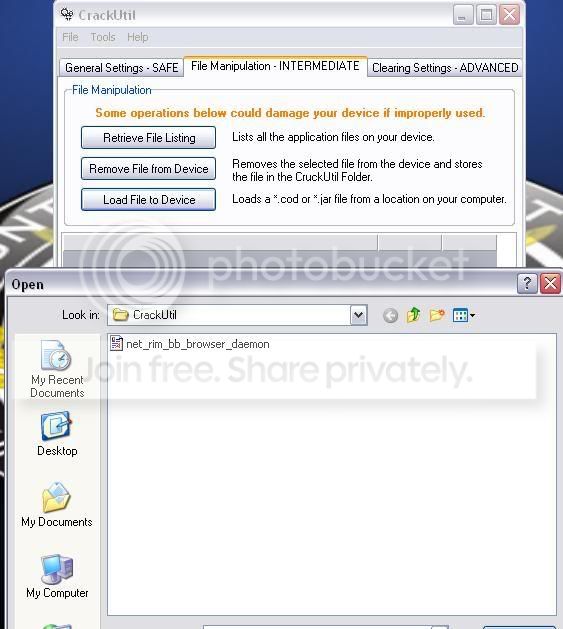
Connect the Storm (and leave connected throughout the procedure) to pc and open CrackUtil. Enter your password if you use one. Select the File Manipulation Tab, then select Retrieve File Listing. Scroll down until you see the module net_rim_bb_browser_daemon Click on it and select "Remove File From Device".You will get a Grid Index Out of Range message at this point. That's normal, close CrackUtil. The Storm will be in the process of rebooting and may have an "Uncaught Exception Error" This is normal.

STEP #2
Now, Open Desktop Manager and go to Back up and Restore>Advanced. You will see the Storm's databases in the box on the right. Over the box on the left, select File>Open. Locate and Double click on the Service books .ipd file you downloaded and extracted earlier. They should now be in the left box. Single click to highlight them in the left box and hit the bottom of the two middle buttons to transfer them to the Storm. When that is done, return to the Main Menu, then close Desktop Manager.

STEP #3Open CrackUtil. Go to the File Manipulation Tab, select Load File to Device A window will open containing the net_rim_bb_browser_daemon module you removed. Double click on it to replace it. When thats done you can Exit CrackUtil. You can now disconnect from pc. The Storm will be in the process of rebooting.
You can then disconnect the Storm from the PC. You should have a Fully Functional Browser now. Resend your email service books from AT&T to restore your email. Also you need TCP configurations in Options>Advanced Options>TCP. APN should say wap.cingular Username: [email protected] Password: CINGULAR1
If you are using an unlocked Verizon Storm and have "Activation Required" on your home screen or your phone number displays incorrectly, Dial # # 000000 (Send). In the Menu, change the mobile directory number to your phone number and select save. The device will reboot and activate/display the correct number.
================================================== ================================================== ==============================================
Method #2
STEP BY STEP HOW TO
Before You Begin:
Your Storm must be unlocked. If it's not, I recommend Uniquephones You Need a AT&T SIM Card With An Active Blackberry Data Plan Desk Top Manager 4.6 or Higher (this is the disc that came with your phone or can be downloaded HERE I recommend 4.6
WHAT YOU NEED:
First you will need your Storm's Operating System installed to your PC. On the Storm go to, Options>About to find what OS you have. You can download the appropriate OS below. Select your OS link, download and install to your computer.
OS 4.7.0.75 (you will need to know a(any) valid Verizon Phone Number to Download)
OS 4.7.0.76
OS 4.7.0.78 For 9500
OS 4.7.0.83
OS 4.7.0.83 For 9500
OS 4.7.0.85
OS 4.7.0.85 For 9500
Once you have downloaded the OS, double click on the icon to launch and install the OS to your PC. Next, Go to My Computer C:\Program Files\Common Files\Research In Motion\AppLoader. Find (usually at the bottom) and Delete the vendor.xml file. Then close.
Next you need At&t Generic Service Books below.
Download/Save to your desktop, right click on the Zip file and select "Extract All". Inside is one .ipd file. You'll come back to it in step 3.STEP #1Go to My Computer C:\Program Files\Common Files\Research In Motion\Shared\Loader Files\{Your OS Here}\Java. Locate the module net_rim_bb_browser_daemon typically in the fourth row down when in icon view. CAREFULLY right click on it and select CUT. Right click again on nothing this time, and go to New>Folder. Open the new folder, once inside Right click and select Paste, putting the net_rim_bb_browser_deamon module inside. Close all windows.
STEP #2With the AT&T SIM card inserted, connect the Storm to the PC and open Desktop Manager. Go to Application Loader. Add/Remove Applications. If you downloaded a Multi-language version of your OS you will get a prompt to update languages. You can ignore. Select NEXT then FINISH. You will see the net_rim_bb_browser_daemon module being removed. Once the loading operation is successful. Return to the Desktop Manager Main Menu.
STEP #3Now go to Back up and Restore>Advanced. You will see the Storm's databases in the box on the right. Over the box on the left, select File>Open. Locate and Double click on the Service books .ipd file you downloaded and extracted earlier. Single click to highlight them in the left box and hit the bottom of the two middle buttons to transfer them to the Storm. Then return to the Desktop Manager Main Menu. Minimize.
STEP #4
Next, return to My Computer C:\Program Files\Common Files\Research In Motion\Shared\Loader Files\{Your OS Here}\Java. Open the New Folder you created. Right click on the net_rim_bb_browser_deamon module. Select cut, select Back and right click and paste back into place. Delete the now empty New Folder you created. Close the Java folder.
STEP #5
Return to Desktop Manager. Go to Application loader. Add/Remove applications. Select NEXT then FINISH. You will see the net_rim_bb_browser_daemon module being replaced.

Select Finish. When the Loading operation is successful. You can then disconnect the Storm from the PC. You should have a Fully Functional Browser now. Resend your email service books from AT&T to restore your email. Also you need TCP configurations in Options>Advanced Options>TCP. APN should say wap.cingular Username: [email protected] Password: CINGULAR1
If you are using an unlocked Verizon Storm and have "Activation Required" on your home screen or your phone number displays incorrectly, Dial # # 000000 (Send). In the Menu, change the mobile directory number to your phone number and select save. The device will reboot and activate/display the correct number.Last edited by pltaylor; 08-25-10 at 10:00 PM.
12-02-08 12:21 PMLike 8 -
- 197
12-02-08 12:42 PMLike 0 -
- 6,648
Hope you AT&T people appreciate this one! Lot's of folks put in work on this one. I don't have At&t anymore or an unlocked Storm, so I had to farm most of this one out. Thanks for all the BBM's, emails, and OS reloads! jdmoises27 kwackberrwii MeCka amazinglygracelessLast edited by pltaylor; 03-10-09 at 08:57 PM.
kid3 and mikebecker like this.12-02-08 12:43 PMLike 2 -
- 9,117
Crucial_XtremeRetired ModeratorGJ Taylor. You know how many people you helped with these two guides? Many!! Good job bro.Walawa offset likes this.12-02-08 04:02 PMLike 1 -
- 9,117
Crucial_XtremeRetired ModeratorHaha, I appreciate it bro, but this is all you. Seriously, good job. This is going to save a lot of members a lot of time and headaches. Good job bro. 12-02-08 04:36 PMLike 0
 -
- 86
Maybe I am just not looking for ALL the features but all I had to do is get an unlock code, change SIM card to ATT, and change network to GSM. Works like a charm data, voice, browser etc. BES setup as well. I can even change back and forth as long as I keep my Verizon account. So what am I missing out on?12-02-08 06:25 PMLike 0 -
- 86
Yes I did keep Verizon for now as I am still under contract until February. What is the downside when I drop Verizon as I am using the ATT network? No more updates? Or do you mean this is for folks that purchased with no Verizon contract and thus cannot initially activate? However that raises the question how do they get an unlock key unless they pay?12-02-08 06:34 PMLike 0 -
- 6,648
When you cancel Verizon you will no longer have access to their service books. If you update the OS, register with the network or take out and replace the SIM. Those service books will be lost. As At&t doesn't have the Storm, they haven't written the needed books. And you will not have browser or MMS capabilities. Or like you mentioned for people who buy the phone outright. And there are many ways to unlock a phone. 12-02-08 06:47 PMLike 0
 -
- 70
I don't know if this makes a difference at all, But all I did was get the phone unlocked, got on ATT Blackberry site and registered and everything except for MMS is working.
I changed the APN as mentioned above, but MMS is still not working.
Maybe, when I get my Macbook Pro later this week I will try it the other way.
thanks for the great guide.12-02-08 07:14 PMLike 0 -
- 52
I have my storm unlocked. However, I use it mostly on verizon. When I go out of the country, I will use my work AT&T sim card. Will this cause any negative affect on using both verizon and at&t networks? Thanks
-sorry if its a dumb ?, just want to make sure I can still use verizon.12-02-08 07:22 PMLike 0 -
- 439
-
- 439
-
- 8


- Forum
- BlackBerry OS Phone Forums
- More BlackBerry Phones
- BlackBerry Storm Series
HowTo:Get All Features (Browser, MMS) Working on AT&T w/Unlocked Storm 95xx
LINK TO POST COPIED TO CLIPBOARD