Results 1 to 8 of 8
  1. morrow95's Avatar
    CrackBerry Abuser

    Posts
    142 Posts
    Global Posts
    176 Global Posts
    Thread AuthorThread Author   #1  

    Default time/date in backup file name?

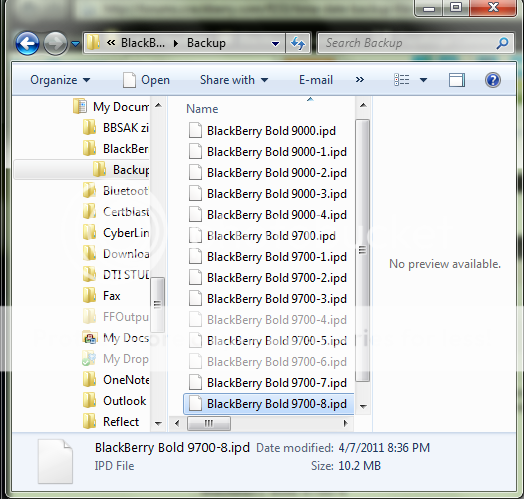
    Back in the day my desktop manager would always save my backup files with the date and time in the filename of the backup... I've noticed lately with the last few builds that it is always something like :

    BlackBerry Bold 9700-3

    then the next backup I create would be

    BlackBerry Bold 9700-4

    ... how the heck do I change it back to the way it was without manually entering in a new filename? It was something like BlackBerry Bold 9700-04-15-11-18:53 or something like that? Is it even possible now to do that?
  2. Laura Knotek's Avatar
    CrackBerry Geek

    Posts
    11,136 Posts
    Global Posts
    16,293 Global Posts
    #2  

    Default

    When one clicks on a particular backup file in Windows Explorer, the date and time it was modified is shown.

    Last edited by lak611; 04-16-2011 at 01:10 PM.
  3. morrow95's Avatar
    CrackBerry Abuser

    Posts
    142 Posts
    Global Posts
    176 Global Posts
    Thread AuthorThread Author   #3  

    Default

    hahaha... yeah, it also will do that for any file on your entire os... who knew!? (enter sarcasm here)

    Now, does anyone know how to change the filenames to have the date in them like they used to be?
  4. Laura Knotek's Avatar
    CrackBerry Geek

    Posts
    11,136 Posts
    Global Posts
    16,293 Global Posts
    #4  

    Default

    Why does it matter? What's so hard about checking via Windows Explorer?
  5. ridesno159's Avatar
    CrackBerry Genius of Geniuses

    Posts
    5,247 Posts
    PIN
    What's that?
    #5  

    Default

    I just enter in the date when I create a backup. It takes all of 2 seconds to do so.

    Why RIM changed this? I don't have a clue, but it's the way it is now. I completely agree with Laura though, it doesn't matter at all. Do what she suggests or rename your backups. Either way it's not anymore difficult or time-consuming to do so, just different.

    If it's that big of a deal to you then, there's nothing stopping you from downgrading DM back to a 5.0 version.

    Also, when you go to restore a back up, it will show the date right next to it.
  6. Vinnie-Velo's Avatar
    CrackBerry Newbie

    Posts
    9 Posts
    #6  

    Default

    Agree with morrow95 - why take away a feature that worked well? This isn't a new feature request, this is a "don't take it away."

    Using windows explorer to get the modification date, or tagging the file with the date is simply less convenient, at least for me (and morrow95).

    Back to DTM 5 for me.
  7. morrow95's Avatar
    CrackBerry Abuser

    Posts
    142 Posts
    Global Posts
    176 Global Posts
    Thread AuthorThread Author   #7  

    Default

    Just to let everyone know... the new DM release that just came out has brought back the full date in the backup filenames... apparently I wasn't the only one who liked this feature.
  8. frifred's Avatar
    CrackBerry User

    Posts
    97 Posts
    Global Posts
    99 Global Posts
    #8  

    Default

    I liked that feature as well. Never understand why RIM always changes little things like that.

    Posted from my CrackBerry at wapforums.crackberry.com

Posting Permissions