-

- 3,280
Here are some Blue Skins for you all....I simply recolored the black ones that BT posted...
BT gets all the credit here, I am just simply recoloring his original ones that he found. I have never posted a zip file on CB. I know that the folder works because I am using it now but can someone reply and let me know if this zip file works for you, much appreciated. Here are 2 screenshots..first one is with the blue skin and the second one is of a Vikings emblem, which still needs work.
BT has already sent me many different designs..it is not difficult to do, just time consuming...........
These are the same size on the home and app screen.Last edited by LuJuCa; 07-31-10 at 04:23 AM.
07-27-10 04:00 PMLike 0 -
- 10,522
There seems to be an issue with BatteryEX versions 1.6 and 1.7 and skins. Make sure you have version 1.8 or higher free or paid if you cannot get skins to show.
If you do upgrade or want to upgrade do a backup first using BBSAK or similar so you can go back if skins do not work or download the zip from the bottom of this post and install via PC or follow the link for OTA that BlastTyrant found. Not in English but scoll down to the link for 1.5
BatteryEx OTA
For those having trouble adding Icons this may help. First open up your Media Folder in Windows:
Double Click to Open your Blackberry Folder (Your memory Card):
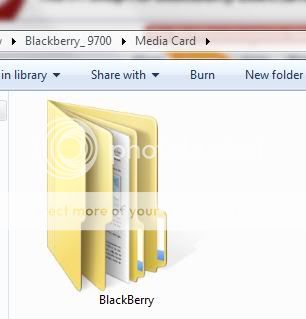
Locate the m4dev Folder and Open that:
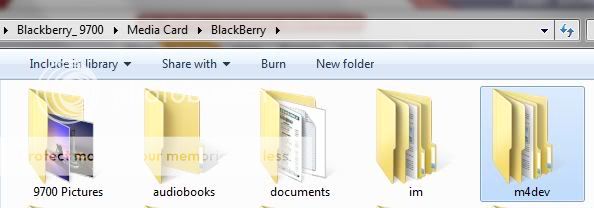
Create a 'Skins' Folder inside the m4dev folder and Open that:
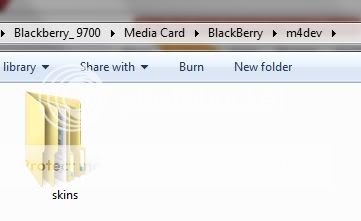
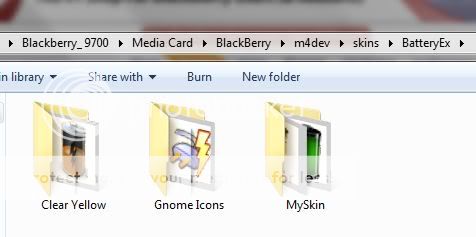
Name a New Folder 'BatteryEx' and Open that:
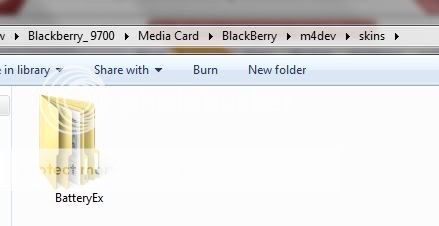
Place all your unziped skin folders in this folder. Note: Make sure you do not have a folder within a folder for each Icon set.
Go to the application scroll to the Skin Tab and chose your skin:

Last edited by andyahs; 12-12-10 at 07:01 PM.
07-27-10 05:07 PMLike 6 -
- 917
I just thought of an interesting idea for skins. Don't know if it would be possible, or how good it would turn out graphically, but you know how in the original Doom game how the picture of the character's face would change/get bloodier as your health decreased? This, or something similar, would be awesome.07-27-10 05:13 PMLike 0 -
- 3,280
Yes that can be done....time is all you need...you could put any pic you want there actuallyI just thought of an interesting idea for skins. Don't know if it would be possible, or how good it would turn out graphically, but you know how in the original Doom game how the picture of the character's face would change/get bloodier as your health decreased? This, or something similar, would be awesome.07-27-10 05:58 PMLike 0 -
- 3,280
The blue ones I posted are actually just tinted. I will post some red tinted ones tomorrow. I will play around with making them a solid color as well but it looks like it will lose the way the increments look on your device...I will test some on my phone at some pointLast edited by LuJuCa; 07-27-10 at 08:14 PM.
07-27-10 06:03 PMLike 0 -
- 14,793
It would be cool if the icon had 5 increments instead of 4, to match the 20% increments.
I'd love to see more variants in black and grey (and maybe white?). Maybe also the turquoisy-blue of the OS6 icon focus...
Thanks so much to BlastTyrant and LuJuCa for all the legwork!07-27-10 06:15 PMLike 0 -
- 14,793
Thanks Andy for this great tutorial! I'm sure it will help a ton of people.
I had 2 things that didn't appear the same as yours. This wasn't an issue�I'm mentioning in case anyone else sees it the way I did.
(If it matters, I'm running Windows7 Ultimate 64-bit edition.)
1. When accessing my attached BB through my PC, there was no Media Card folder under BlackBerry. All of the folders on my SD card including m4dev were just listed in my BlackBerry folder. (I double-checked and these files are in fact only on my card, not my device. Phew!)
2. After extracting the file of each icon set, I had an extra unnecessary layer of folders with the same names.
Example:
In my BatteryEx folder I would see a folder called Grey Icons. That folder contained another folder called Grey Icons which actually contained the icon set.
Easy fix:
-I right clicked the Grey Icons folder inside the Grey Icons folder, and chose Cut.
-Then I went up to the BatteryEx folder, clicked on same blank real estate, and tried to Paste.
-I was asked if I wanted to merge the 2 folders called Grey Icons and selected Yes (or whatever the affirmative option was).
-And then all was as it should be.
I was probably screwing up something to have issue #2, but the workaround was no big deal.07-27-10 06:50 PMLike 0 -
- 14,793
Looks like it worked!
Cami's new Deceit theme (not yet released) has dark blue highlights, so I choose the blue one to start:
[IMG] [/IMG]07-27-10 06:55 PMLike 0
 -
- 116
I love the unity in this forum. I think I'll stay here awhile. lol. You guys are doing a great job and it's very much appreciated. I was telling my friend some teddy bear icons may be cute. Though the health and decreasing health as the battery drains sounds hot.07-27-10 07:07 PMLike 0 -
- 10,522
It depends how they are extracted. Just need to make sure as you said there is not a double folder or folder within a folder for each skin set.....Thanks Andy for this great tutorial! I'm sure it will help a ton of people.
I had 2 things that didn't appear the same as yours. This wasn't an issue�I'm mentioning in case anyone else sees it the way I did.
(If it matters, I'm running Windows7 Ultimate 64-bit edition.)
1. When accessing my attached BB through my PC, there was no Media Card folder under BlackBerry. All of the folders on my SD card including m4dev were just listed in my BlackBerry folder. (I double-checked and these files are in fact only on my card, not my device. Phew!)
Running Windows 7 64 bit as well and the BB Folder is on the Media Card so you are correct but thought I had written it correctly - will edit it for clarity.
2. After extracting the file of each icon set, I had an extra unnecessary layer of folders with the same names.
Same here just need to do what you said so you have only one folder per skin.
Example:
In my BatteryEx folder I would see a folder called Grey Icons. That folder contained another folder called Grey Icons which actually contained the icon set.
Easy fix:
-I right clicked the Grey Icons folder inside the Grey Icons folder, and chose Cut.
-Then I went up to the BatteryEx folder, clicked on same blank real estate, and tried to Paste.
-I was asked if I wanted to merge the 2 folders called Grey Icons and selected Yes (or whatever the affirmative option was).
-And then all was as it should be.
I was probably screwing up something to have issue #2, but the workaround was no big deal. 07-27-10 07:10 PMLike 0
 -
- 549
-
- 917
The best icons I could find are here tinyblob.com | doom unless you have access to better ones. Maybe one image per 20%?
I was doubtful of the quality due to the extreme pixelation, but if someone could make it work that would be great. I really don't have the time or patience to do my own.07-27-10 07:57 PMLike 0 -
- 3,280
There are actually 6 increments for discharging, 6 for charging for each size(home screen and app screen) and 1 preview.It would be cool if the icon had 5 increments instead of 4, to match the 20% increments.
I'd love to see more variants in black and grey (and maybe white?). Maybe also the turquoisy-blue of the OS6 icon focus...
Thanks so much to BlastTyrant and LuJuCa for all the legwork!
0%-20%-40%-60%-80%-100%.
Are you saying that there are some missing in the zip file I posted?
Posted from my CrackBerry at wapforums.crackberry.comLast edited by LuJuCa; 07-30-10 at 05:03 AM.
07-27-10 08:10 PMLike 0 -
- 10,522
-
- 374
-
- 14,793
Sorry, six!
Oh no, I was being more literal: how many bars are in the battery icon. With 5 bars (like the OEM Home Screen icon) the charging & discharging could correspond with 1 bar in the icon per 20% increment.
i.e. if you're at 100% the icon has 5 bars, 80% 4 bars, and so on.
No big deal since the exact charge percentage is right beside this notifier icon, I was just sayin'...07-27-10 08:20 PMLike 0 -
- 3,280
In the what does your screen look like thread FlyBabyRoxy just posted that she knows someone who is making some girly ones. Also I read on BBBM's site that Emarsha has been making some girly ones as well. There are many more people that are better at this than I am.
Posted from my CrackBerry at wapforums.crackberry.com07-27-10 08:41 PMLike 0 -
- 549
I saw that too on BBBM's blog. EMarsha posted step by step directions for making them. When I went back later to get the directions, the blog was locked down again.In the what does your screen look like thread FlyBabyRoxy just posted that she knows someone who is making some girly ones. Also I read on BBBM's site that Emarsha has been making some girly ones as well. There are many more people that are better at this than I am.
Posted from my CrackBerry at wapforums.crackberry.com Soo, I guess I'll just wait...07-27-10 09:35 PMLike 0
 -
- 3,280
I know what you mean. I have the patience but not the time.The best icons I could find are here tinyblob.com | doom unless you have access to better ones. Maybe one image per 20%?
I was doubtful of the quality due to the extreme pixelation, but if someone could make it work that would be great. I really don't have the time or patience to do my own.
Posted from my CrackBerry at wapforums.crackberry.com07-27-10 09:56 PMLike 0 -
- 5,297
I just want to thank you all for taking the time in providing us with step by step instructions, pictorials and of course, cool icons (lol). I'm not computer savvy, by any means, and the instructions provided here on this thread has helped.
Thanks LuJuCa, BT, Andy, and m4dev. I know I'm missing ppl (sorry) but I 'thank you' as well. You all totally rock!
Posted from my CrackBerry at wapforums.crackberry.comLast edited by lourdes; 07-28-10 at 12:28 AM.
07-27-10 11:06 PMLike 0 -
- 3,643
Y'all are battery ex pros. I appreciate and thank y'all for all your creations and help. My berry is surely happier with all these skins
Posted from my CrackBerry at wapforums.crackberry.com07-28-10 12:10 AMLike 0


- Forum
- BlackBerry OS Phone Forums
- BlackBerry OS Apps
App update - BatteryEx updates to 1.5
LINK TO POST COPIED TO CLIPBOARD